Basic Computer Kya Hota Hai? Beginner-Friendly Guide (2026 Edition)
Computer ki duniya ko bilkul easy language mein samjhiye – Complete Roadmap & Fundamentals
| 📌 SEO Metadata & Optimization Details Meta Title: Basic Computer Kya Hota Hai? Complete Beginner Guide in Hinglish Meta Description: Jaaniye computer kya hota hai, ye kaise kaam karta hai (IPO cycle), hardware vs software, operating system aur beginners ke liye pehle steps. Target Keywords: basic computer kya hota hai, computer parts, IPO cycle, hardware software difference, operating system, computer full guide beginners |
|---|
1. Basic Computer Kya Hota Hai? (What is a Computer?)
Computer ek smart electronic device hai jo raw data ko input ke taur par receive karta hai, us data ko set instructions ke mutabiq process karta hai, aur hume high-accuracy ke saath useful information output formatting mein deta hai.
Aasan shabdon mein, computer ko aap apna ek intelligent aur super-fast helper samajh sakte hain jo aapke diye gaye commands ko perfectly follow karta hai. Aaj ke digital era mein computer sirf offices tak restricted nahi hai; school, college, banking sector, retail shops, hospitals, railway stations, aur ghar-ghar tak har jagah iska istemal ho raha hai.
ss
2. Computer Kaise Kaam Karta Hai? (Working Principle: IPO Cycle)
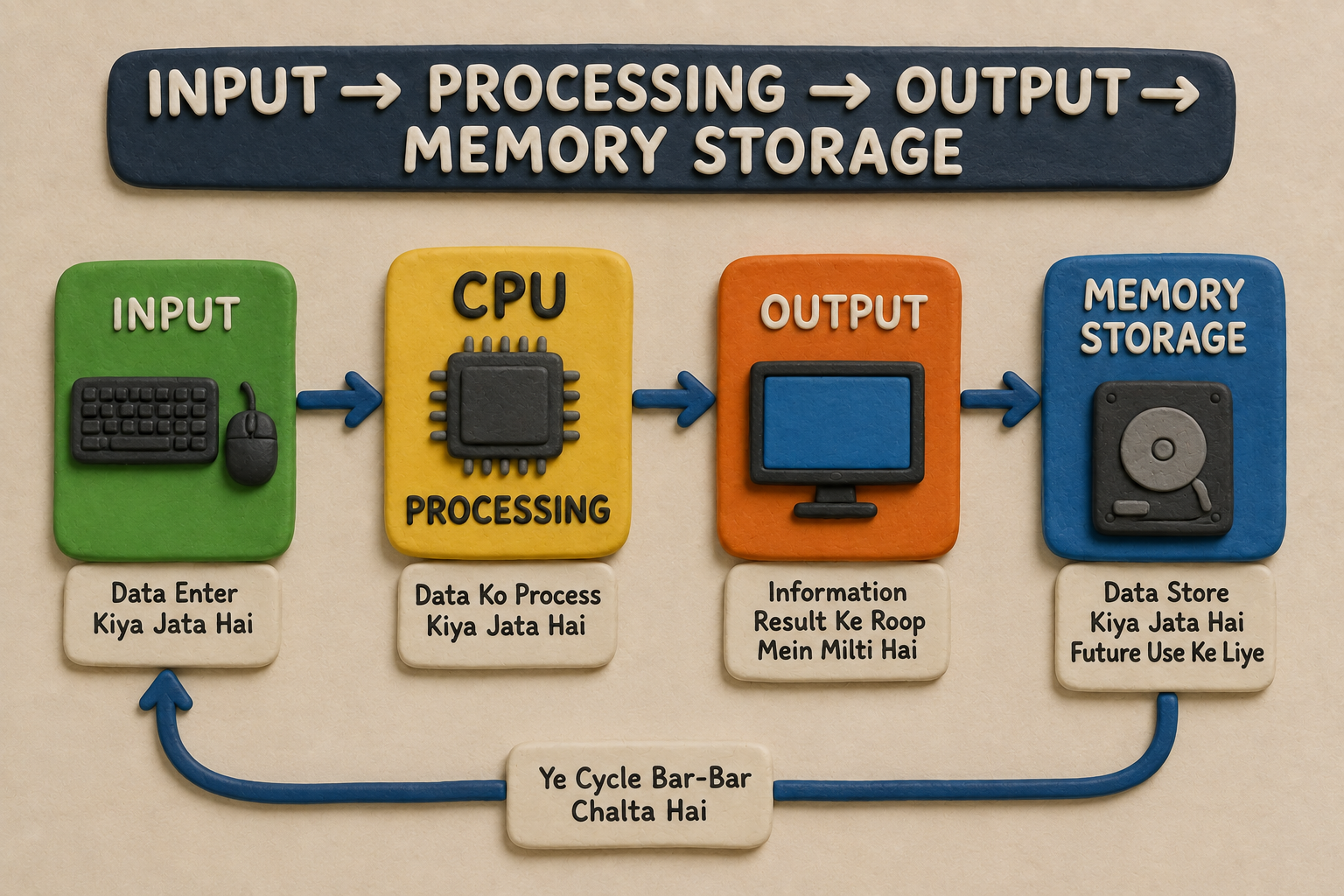
Computer ka kaam karne ka tareeka ek simplified cycle par base hota hai jise Input → Processing → Output → Storage (IPO Cycle) kaha jaata hai:
• Input: User keyboard, mouse ya touch-screen ke dwara computer ko raw data ya specific command deta hai. (Example: Keyboard par apna naam type karna).
• Processing: Central Processing Unit (CPU) aapke dwara diye gaye input data aur instructions ko analyze aur execute karta hai.
• Output: Processing poori hone ke baad computer screen par final visual result dikhata hai. (Example: Monitor par aapka naam display hona).
• Storage: Future reference ke liye data ko hard drive, SSD ya cloud storage mein secure save kar liya jaata hai.
3. Computer Ke Main Parts Aur Unka Role
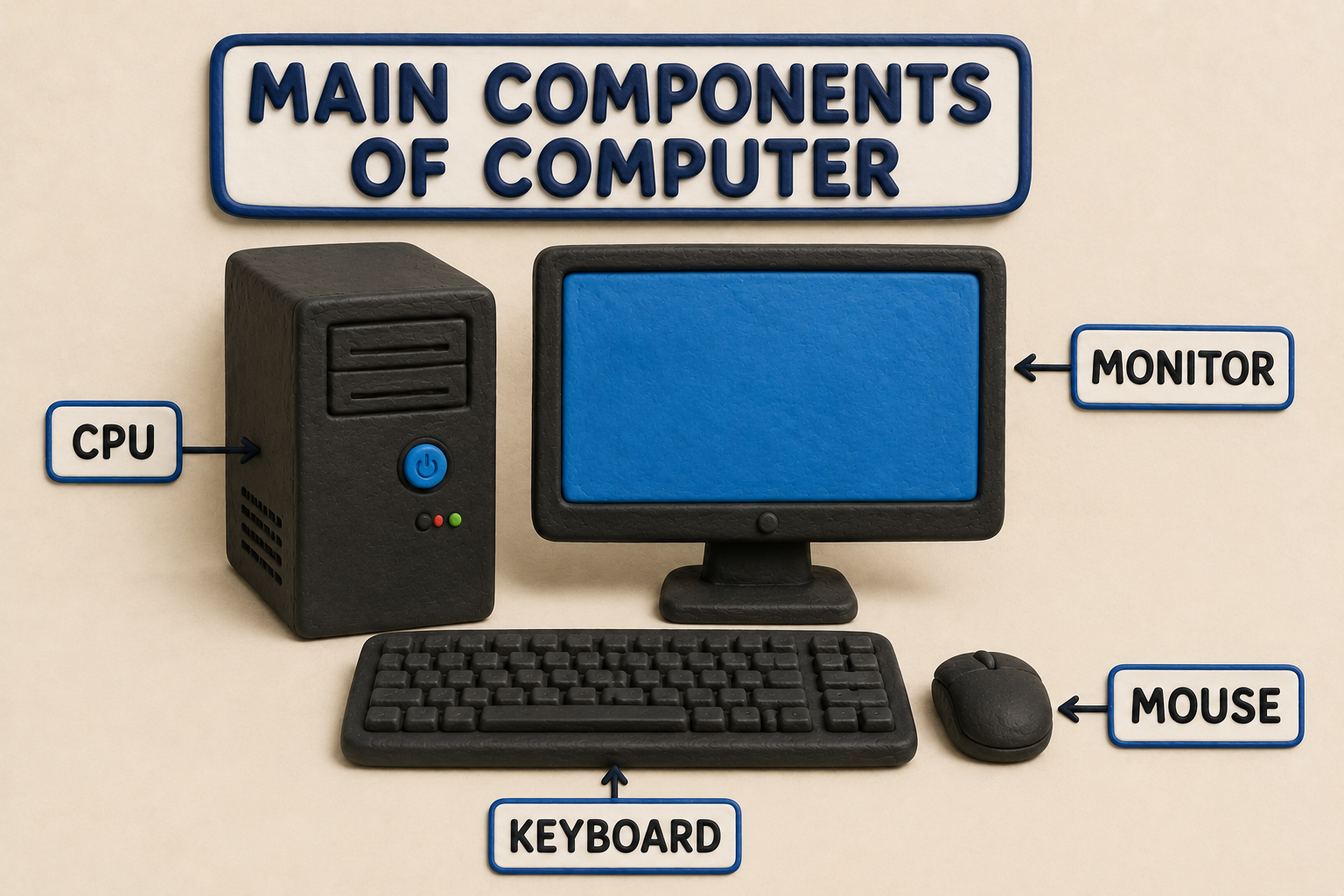
Computer system ko efficient tarike se samajhne ke liye uske core components ko jaan na zaroori hai:
Component
| Type
| Primary Function / Task
| |
|---|---|---|
| CPU (Brain) | Processing Unit | Instructions handle karta hai aur calculations perform karta hai. |
| Keyboard | Input Device | Text type karne, numbers aur shortcuts enter karne ke liye. |
| Mouse | Input Device | Screen par items select, click aur move karne ke liye cursor control. |
| Monitor / Display | Output Device | Processed data ko visual form (text, images, videos) mein dikhata hai. |
| Printe | Output Device | Digital documents ko physical paper par print karta hai. |
| Speakers | Output Device | Audio files, music aur system alert sounds sunane ke kaam aata hai. |
4. Hardware Aur Software Mein Kya Difference Hai?
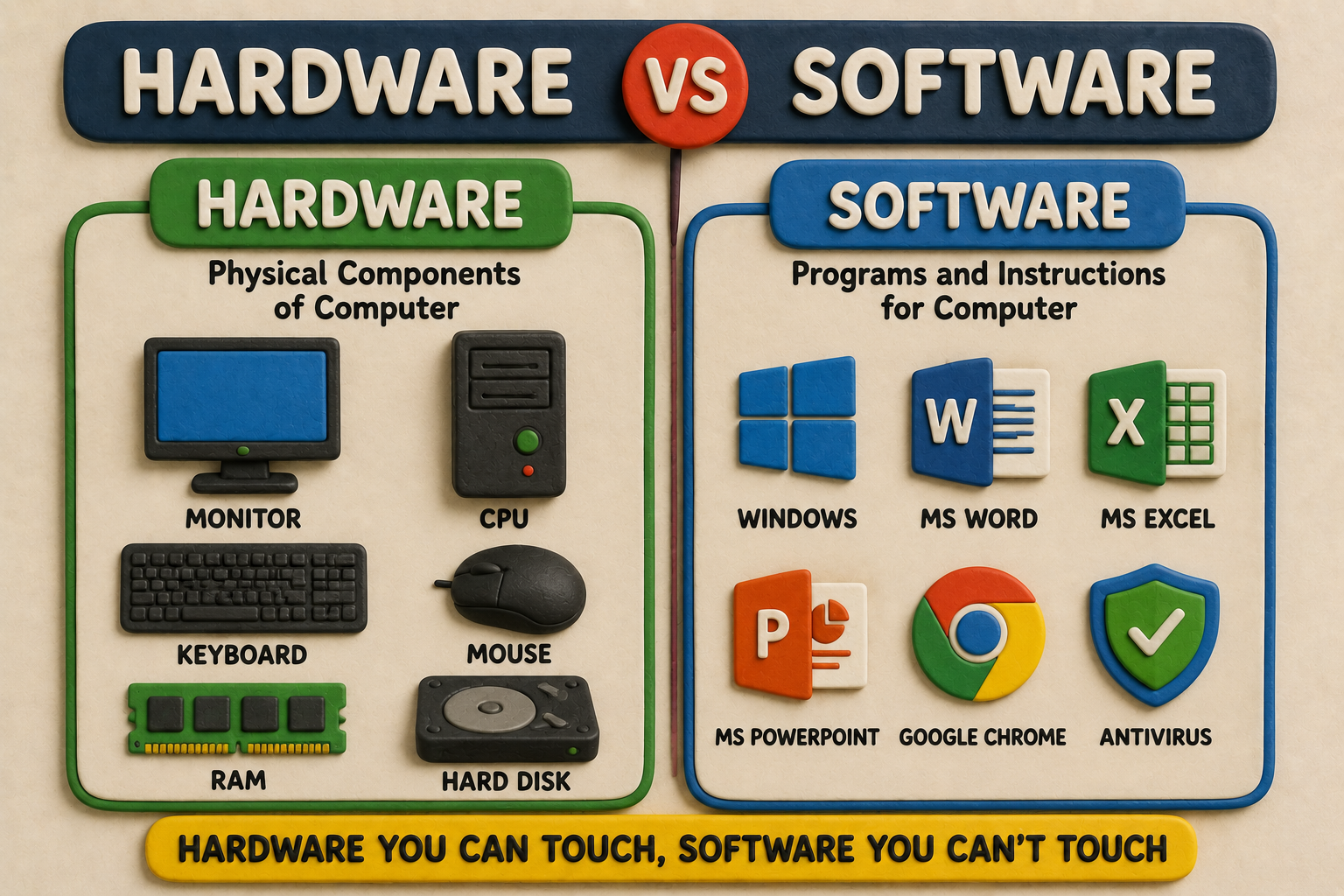
Computer tech world do main Pillars par tikka hua hai: Hardware aur Software. Dono ke bina computer incomplete hai.
• Hardware: Computer ke sabhi physical parts jinhe aap dekh sakte hain aur touch kar sakte hain, hardware kehlate hain. Example: Keyboard, Mouse, CPU, Hard Drive, RAM.
• Software: Programs, code aur instructions ka set jo hardware ko direction deta hai ki kaun sa kaam kaise karna hai, usse software kehte hain. Example: Windows 11, Chrome Browser, MS Word, VLC Player.
💡 Simple Analogy: Hardware computer ka jism (body) hai aur Software uski aatma (soul). Dono ka saath hona system functionality ke liye zaroori hai.
5. Operating System (OS) Kya Hota Hai?
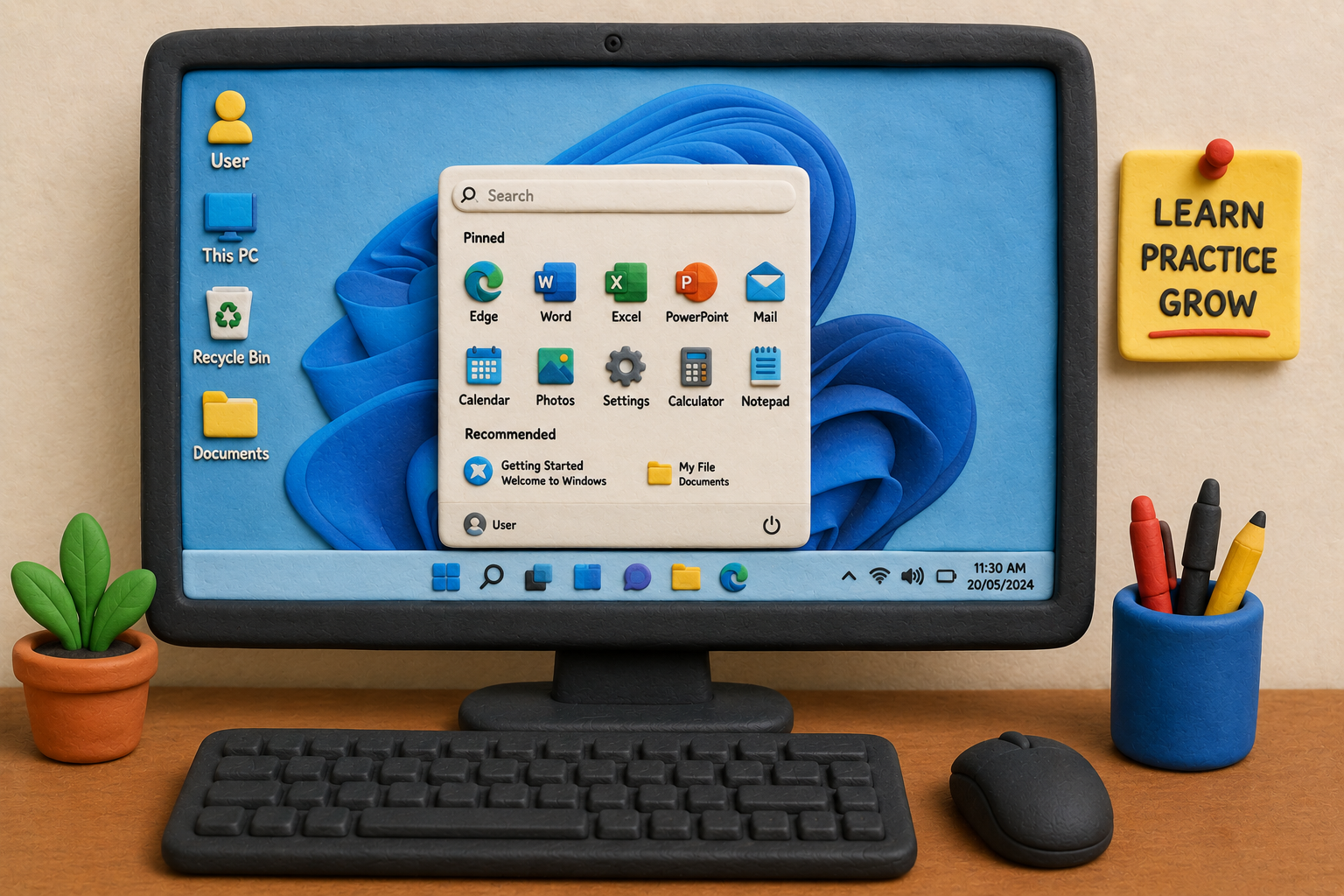
Operating System (OS) computer ka main Master Software hai. Ye user, applications aur hardware ke beech ek bridge (connection) ki tarah kaam karta hai.
Jab aap computer ON karte hain, sabse pehle Operating System hi load hota hai. Windows, macOS, aur Linux popular desktop operating systems hain. OS ke bina aap screen par files manage nahi kar sakte, apps nahi chala sakte aur settings access nahi kar sakte.
6. Computer Ka Use Kahan-Kahan Hota Hai? (Real-World Applications)
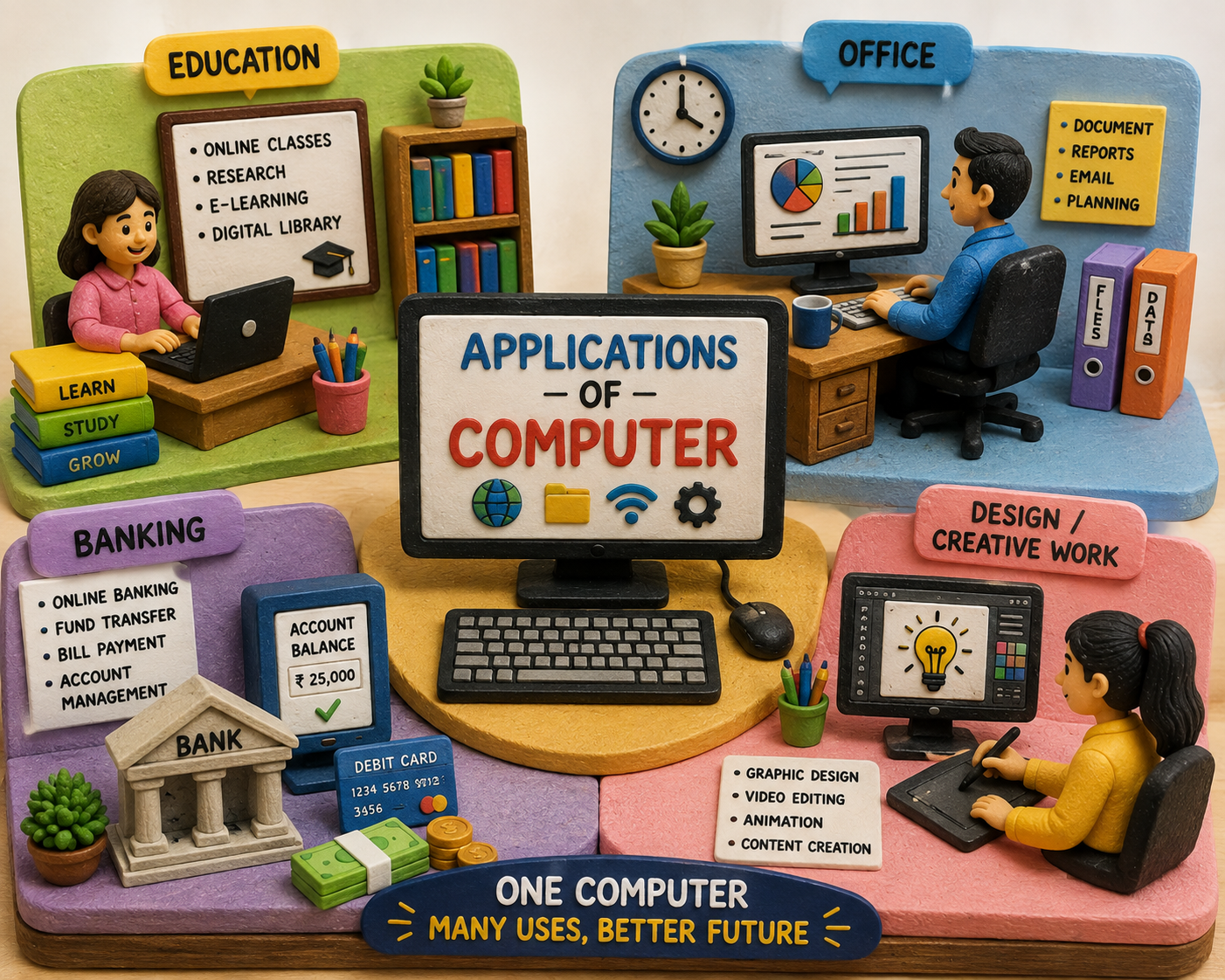
Aaj lagbhag har field computer technology par depend karti hai:
• Education & Students: Online classes, assignments, research work aur digital presentations ke liye.
• Offices & Business: Professional document preparation, official emails, record management aur accounts handle karne ke liye.
• Retail & Shops: Point of Sale (POS) systems, digital billing, stock/inventory tracking ke liye.
• Banking Sector: Online money transfers, secure account records aur daily transaction processing ke liye.
• Creative Industry: Graphic design, video editing, 3D modeling, music production aur website creation ke liye.
7. Beginner Roadmap: Sabse Pehle Kya Seekhein?
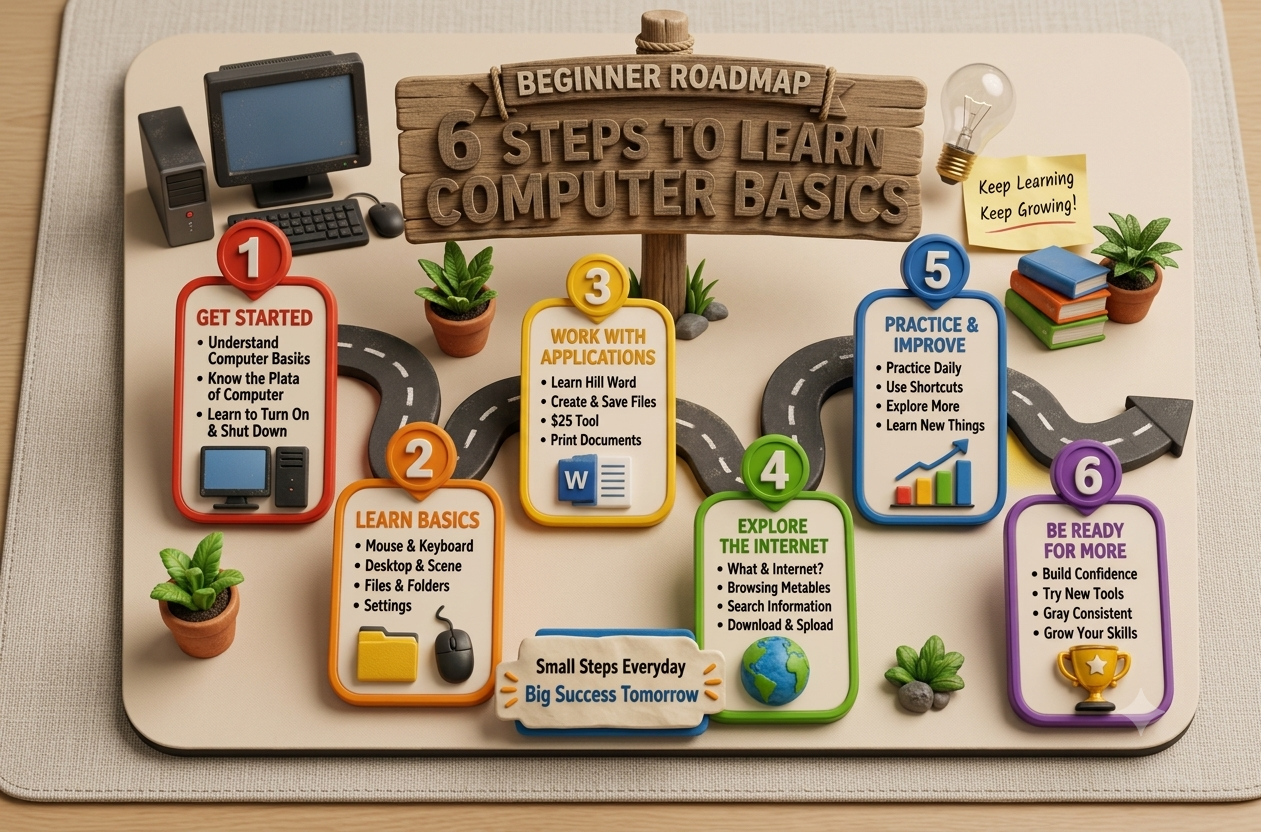
Naye beginners ke liye step-by-step roadmap niche diya gaya hai taaki aap bina kisi tension ke basic mastery kar sakein:
Step 1 - Fundamentals: Properly Computer ON/OFF karna, Power Button aur Shutdown mechanism ko samjhna.
Step 2 - Mouse Control: Right-click, Left-click, Double-click aur Drag-and-Drop operations practice karna.
Step 3 - File Management: New folder create karna, Folder Rename karna, Files Copy, Paste aur Delete karna seekhna.
Step 4 - Basic Typing: Keyboard alignment samjhna, Notepad ya MS Word par simple paragraph typing practice karna.
Step 5 - Internet & Email: Browser launch karna, Web Search, safe website visit aur Professional Email account setup karna.
Step 6 - Next Level Skills: Basic MS Excel/Spreadsheets, Presentation software, aur Cyber Security awareness.
8. Computer Seekhna Kyun Zaroori Hai? (Importance & Scope)
Aaj ke modern digital environment mein basic computer skills ka hona koi optional qualification nahi, balki ek zaroori everyday life skill hai. Computer aane se aap online forms filling, utility bill payments, digital government services, internet research aur career opportunities ko easy tarike se access kar sakte hain.
Remember: Computer learning continuous practice se perfect hoti hai. Pehli baar mein galti karna normal hai; regular experimentation hi aapko digital savvy banayega.
| ✨ Quick Recap (Key Takeaways) ✔ Computer ek smart electronic machine hai jo Input ko Process karke Output deti hai (IPO Cycle). ✔ Main components mein CPU (Brain), Keyboard, Mouse, Monitor aur Printer shamil hain. ✔ Hardware physical components hote hain; Software operational instructions/programs hote hain. ✔ Operating System (OS) hardware aur application software ke beech coordination banata hai. ✔ Beginner ko pehle ON/OFF, Mouse control, File/Folder creation, Typing aur Internet browsing seekhna chahiye. |
|---|
| 🎯 Practical Beginner Challenge Task: Apne computer/laptop desktop par ek naya Folder banayein aur uska naam 'My Computer Practice' rakhein. Detail: Us folder ke andar ek simple text document (Notepad) banayein. Usme apna Naam, City, aur Aaj ki Date likhein. Action: File ko save karein, phir file ka name badal kar 'First_File_v1' karein aur uski ek Copy banakar doosri jagah Paste karein. Result: Is chhote task se aap File creation, Saving, Renaming, Copying, aur Keyboard typing ek saath practically seekh jayenge! |
|---|
Computer Course Seekhna Hai?
Free demo class layi abhi contact karo — Rahon Road, Ludhiana.
📞 Call Now